 .AI
.AITriggers
The trigger types an APIANT automation can start from: polling, schedule, webhook, web service, form, chat, tool input and manual, and when to use each.
A trigger decides when an automation runs and supplies the data its steps read as trigger. Every automation except a subroutine needs at least one trigger, and an automation can carry more than one.
Trigger types
| Trigger | Starts a run when | Data the steps receive | Details |
|---|---|---|---|
| Polling | A schedule fires and APIANT fetches new records from an app | One run pass per new record, with that record's fields | Polling triggers |
| Schedule | A clock time or interval comes round, with no app fetch | The fire time | Scheduled triggers |
| Webhook | An external system sends an HTTP request to a URL APIANT generates | The request body, query parameters and path | Webhook triggers |
| Web service | An HTTP caller invokes the automation and waits for its reply | The request, plus a response the automation returns | Web service automations |
| Form | Someone submits a hosted form | The submitted field values | Hosted forms |
| Chat | A visitor sends a message in a chat widget | The message and its conversation ID | Chat widgets |
| Tool input | An AI agent or MCP client calls the automation as a tool | The arguments the caller passed | Automations as MCP tools |
| Manual | Someone runs it on demand | Nothing from upstream | Running an automation on demand |
A subroutine has no trigger of its own. It runs when another automation calls it and reads the caller's values as trigger.input. See Subroutines and calling automations.
Choosing a trigger
Describe the event in plain English and Claude, or the assistant in the app, picks the trigger that the app's catalog entry supports. The choice comes down to how the source system reports changes:
- The app can call a URL when something changes. Use a webhook trigger. Runs start as soon as the request arrives.
- The app can only be asked for its records. Use a polling trigger. APIANT fetches on a schedule and runs only for records it has not seen before.
- Nothing external starts the work. Use a schedule, for example a daily report at 08:00.
- A caller needs an answer back in the same request. Use a web service trigger.
- A person starts it. Use a form, a chat widget, or a manual run.
To see what an existing automation uses, ask "what kind of trigger does this automation use?"
Several triggers on one automation
An automation stores its triggers as a list. Adding a trigger to an automation that already has a real trigger appends a second one, so one automation can, for example, receive a webhook for instant updates and also poll as a backstop. Each trigger starts its own runs; the steps are shared.
An automation built without a trigger gets a placeholder No-op trigger. It never fires, so the automation stays inert until a real trigger replaces the placeholder.
Running an automation on demand
The dashboard row for an automation has a play button labelled Run now. It opens an execution mode picker:
| Mode | What it processes |
|---|---|
| Normal | What the trigger would process on its own. For a polling trigger, only records not seen before; on a trigger that has never fired, this takes the baseline and processes nothing. |
| Test | Up to three records, ignoring which records were already processed. |
The play button is hidden for subroutines, for automations whose only trigger is a webhook, and for automations whose names start with Tool:. For a form or chat trigger, the play button opens the hosted form or chat page in a new tab instead of starting a run.
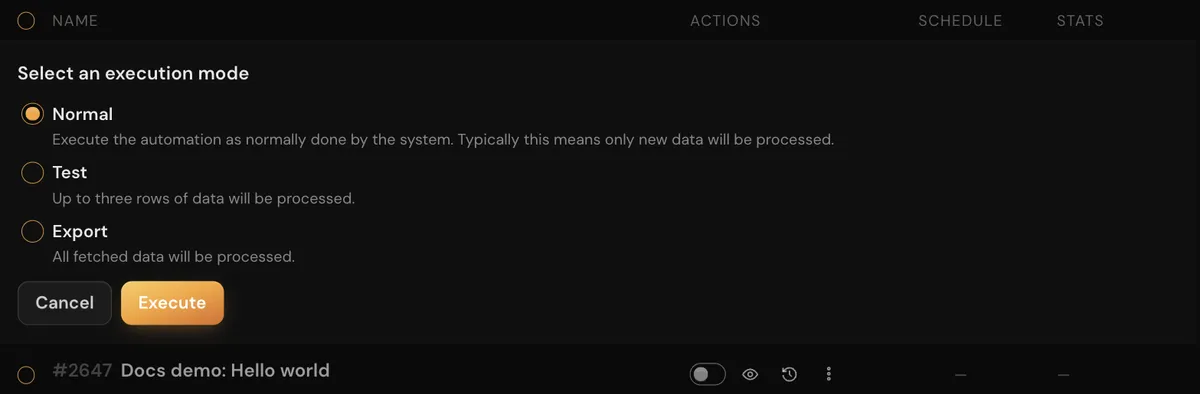
The mode picker replaces the dashboard row inline, with a radio button for each mode and an Execute button.
From Claude Code or the assistant, ask "run this automation" or "test it". See Testing an automation.
Trigger filters
A polling trigger can drop records before any step runs, using a filter such as "only contacts whose plan equals premium". Filters apply to polling triggers only. For any other trigger, a leading condition step does the same job. See Polling triggers.
Next steps
In this section
Polling triggers
How APIANT polling triggers fetch records on a schedule, remember which records they have seen, and what controls the polling interval.
Webhook triggers
How APIANT webhook triggers receive HTTP requests, what the caller gets back, how duplicates are suppressed, and what happens while off.
Scheduled triggers
How APIANT runs automations on a cron schedule or interval, in the account timezone, with execution windows and automatic catch-up of missed occurrences.