 .AI
.AIExecution history
What APIANT records for each run of an automation, how to find, filter, export and stop runs in Execution History, and how long run history is kept.
Every time an automation runs, APIANT records a run: when it started, how it ended, and the input and output of every step. Execution History shows the runs of one automation, and you can open any run to see what each step received and returned.
Open Execution History
From the dashboard, select the history icon on an automation's row. Selecting the red Error badge on a row opens the same page filtered to failed runs.
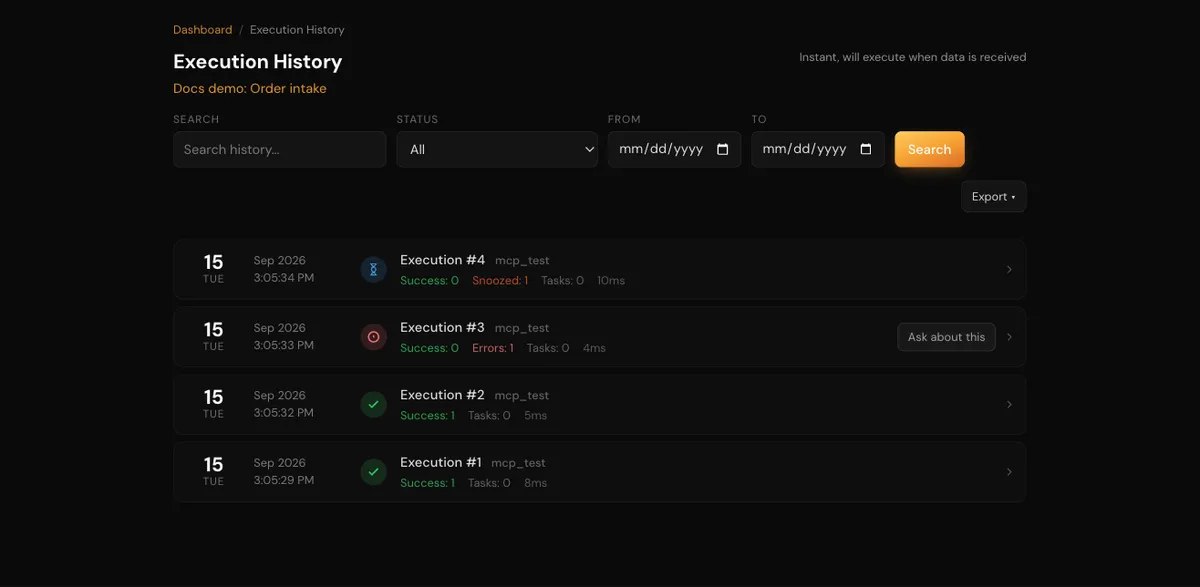
Execution History lists runs newest first, with each run's status, start time and record counts.
For an automation with a schedule or polling trigger, the page shows when it will next run.
What a run records
| Item | Detail |
|---|---|
| Status | How the run ended; see the table below |
| Counts | Records processed with success, error and filtered outcomes, and steps that failed but were recovered |
| Steps | Each step's status, input and output, and the error message for a failed step |
| HTTP detail | For steps that call an API, the request sent and the response received |
| Data rows | For a polling trigger that fetched several records, one row per record, each with its own step results |
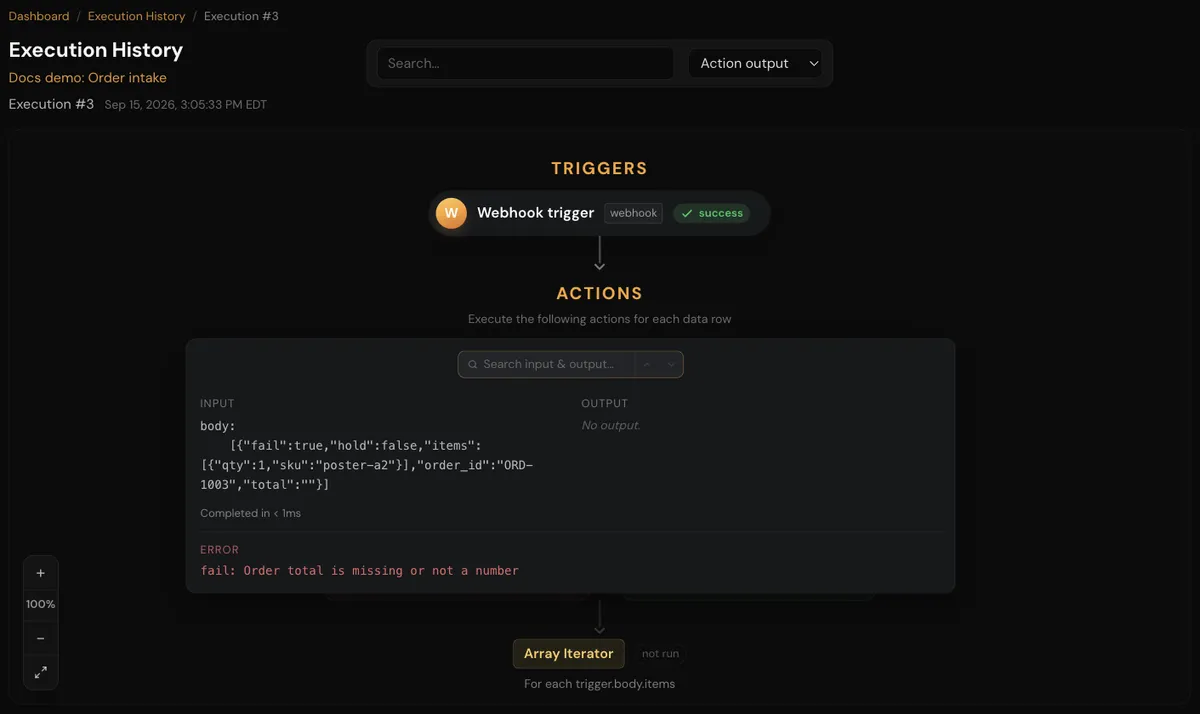
Opening a run lists its steps; expanding a step shows its input, output, and the HTTP request and response when there is one.
Run statuses and filters
| Filter | Shows runs that |
|---|---|
| All | Any status |
| Success | Finished without an error |
| Errors | Ended with an error |
| Success and Errors | Ended as either success or error |
| Filtered | Filtered out at least one record |
| Awaiting Form Submission | Are paused on a form. Open form opens the pending form. |
| Awaiting Moderation | Are paused on an approval. View in moderation queue opens the item. |
| Snoozed | Are paused for any reason: a timer, a form, an approval, or an automatic retry |
| Missed | Were scheduled but never ran. Run it now starts the missed run. |
| Info | Processed no records and are not paused |
| Recovered | Had a step that failed but was handled by an error subroutine, so the run continued |
Narrow the list by date, and use Search history... to find a run by its execution number or by text in a step's error message. Search does not look inside step input or output data.
Actions on runs
| Action | Where | Effect |
|---|---|---|
| Retry… | A failed run | Runs the failed work again. See Retries, replays and restarts. |
| Retry all errors… | The run list | Retries every failed run of the automation |
| Halt execution… | While a run is executing | Stops the run at its next step boundary. The run ends as halted. |
| Notify when done… | While a run is executing | Emails you when the run finishes |
| Wake up / Wake up all snoozed… | Snoozed runs | Resumes the run now instead of at its scheduled time |
| Cancel all snoozed… | Snoozed runs | Cancels the paused runs so they never resume |
| Export ▾ | The run list | Downloads Export history (CSV), Export history + data rows (CSV), or, inside a run, Export data rows (CSV) |
| Ask about this | A failed run, when the in-app assistant is available to you | Opens a conversation with the in-app assistant about that run. See Ask about an automation or a failed run. |
You can also ask Claude about runs in plain English: "What failed in the Shopify order sync today?", "Show me the input to step 3 of the last run", or "Stop the run that is stuck on the Salesforce step."
How long runs are kept
Run history is kept for a number of days set by your plan, then deleted. See pricing for each plan's retention. Runs that are still in progress or paused are never deleted by this cleanup, however old they are.
An automation can have data storage turned off, from its gear menu under Processing > Data storage. With data storage off:
- A successful run's data is deleted as soon as the run finishes.
- Failed and halted runs are deleted by the next cleanup.
- Do not plan on retrying failed runs: APIANT does not keep the data a retry needs.
Next steps
In this section
Retries, replays and restarts
How APIANT retries failed steps automatically, and how to retry a run, restart from a step, or replay a webhook payload.
Error alerts
How APIANT emails you when a run fails, how to set alert frequency and address, and how to rewrite or silence specific alerts.
Troubleshooting automations
Diagnose a failing APIANT automation: 401 turn-offs, empty mapped values, polling triggers that don't fire, webhooks that start no run.