 .AI
.AITesting an automation
Test an APIANT automation before turning it on: sample data, webhook replays, restarting from a step, forcing untested branches, reading results.
A test run executes the saved automation once, right away, whether it is on or off, and records the result in Execution History like any other run. Test runs use your real connections: actions create, update and delete real records in your apps, and successful actions count tasks.
Ask Claude or the assistant to "test it". After building an automation, both run a test before suggesting you turn it on. The assistant follows the same process as Claude below, except where a section says an action needs Claude Code.
What happens in a test
- Claude reads the automation's structure.
- Claude runs it with data suited to the trigger (see below) and waits for the result.
- Claude checks every step and reports one line per step: passed, passed with suspicious data, failed, or skipped.
- If a step failed for a reason Claude can fix, such as a wrong field name, a missing lookup step or a format mismatch, it changes the automation, saves the change, and tests again. It stops when the same error on the same step has happened three times and reports what it tried.
- Claude checks which condition branches the run exercised and covers the rest (see Branch coverage).
A test only passes when:
- No step failed.
- No step failed and was then recovered by error handling. A recovered step means an error was absorbed, so the step needs a look before the run counts as clean.
- The trigger produced at least one record. A run with no records is inconclusive, not a pass.
- No step produced an empty value that a later step depends on.
- Steps that transform data produced the output their input should produce.
Test data by trigger type
| Trigger | How the test gets data |
|---|---|
| Polling | The trigger fetches from the app. On a trigger that has never polled, a test processes the records returned instead of taking a baseline. On a trigger that has polled before, a test still skips records already processed, so it can return none. If the app returns nothing, Claude supplies sample trigger fields; some app triggers fetch live data regardless and ignore the sample. |
| Webhook | Claude supplies a sample body shaped like the app's payload. |
| Webhook, with a previous run | From Claude Code, Claude can replay an earlier run's payload, or a body you provide. |
| Webhook, no known payload | You trigger a real event in the app, or send a request to the webhook URL, and Claude reads the run that follows. |
| Schedule or manual | The automation runs once with no app data. |
Replaying a webhook starts a new run with the recorded or supplied body. It does not send a request to the webhook URL, and it skips duplicate suppression and signature checks.
From the dashboard, Run now with the Test mode processes up to three records and ignores which records were already processed. See Triggers.
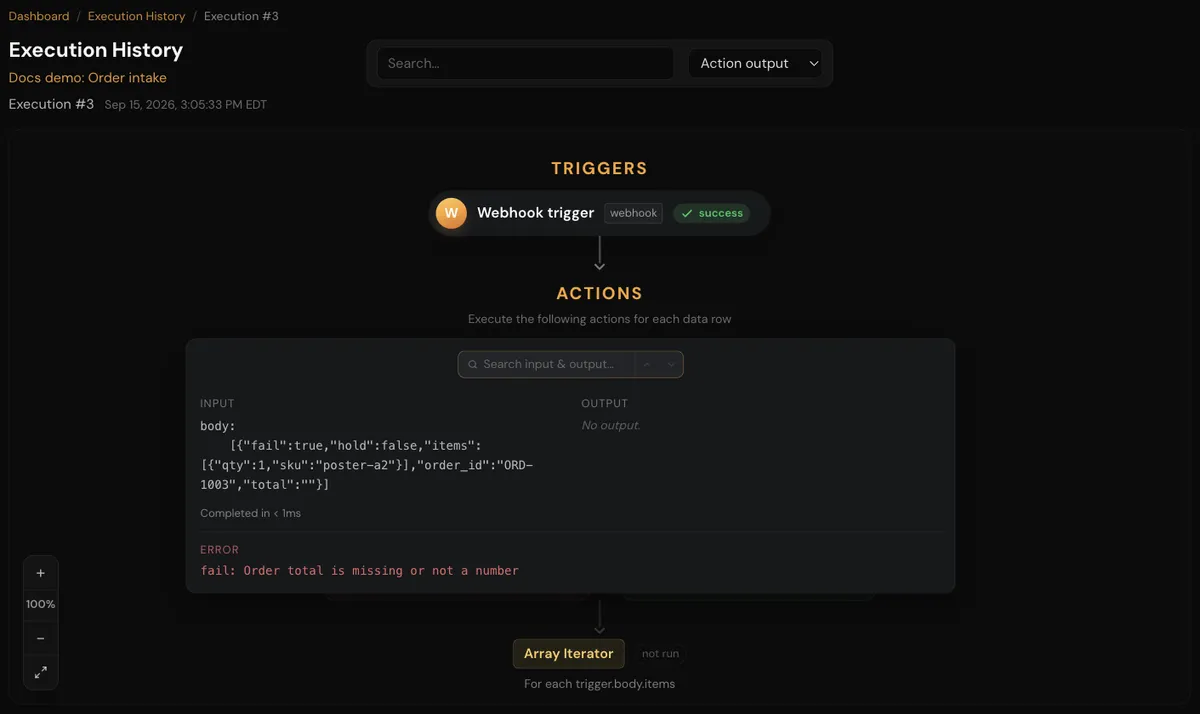
The step detail shows the step's input and output side by side, how long it took, and any error. When recorded, it also shows the request that was sent and, for a failed app call, the app's response status, headers and body.
Rerunning after a fix
From Claude Code, Claude can restart a run from a chosen step instead of triggering the automation again:
- The run keeps its ID. Steps before the chosen step reuse their recorded output; the chosen step and everything after it run again.
- For a run that processed several records, the restart applies to one record.
- Restarting cancels any automatic retry already scheduled for that run.
A restart re-executes actions, so writes to your apps happen again.
The assistant reruns the test with the same sample data instead.
Branch coverage
An automation is not fully tested until every reachable side of every condition has run at least once.
- Claude lists every condition's
thenandelseside and which ones the test run covered, with a count of how many records took each side. - For each uncovered side, from Claude Code, Claude edits the recorded output that the condition reads, for example setting a looked-up email to empty, and restarts the run from the condition. The condition evaluates again and takes the other side.
- Claude checks coverage again until every side is covered or the remainder cannot be reached, and says which branches, if any, remain unproven.
A condition that depends on an app's live state, rather than on data in the run, may not be testable this way. Claude reports it as untested rather than implying it passed.
The assistant can list covered and uncovered branches but cannot edit recorded data. It covers what it can by running the automation again with input that takes the other side.
Claude uses the same technique to test error paths, loops with zero or one item, and what happens when a trigger field arrives empty.
Testing subroutines
From Claude Code, Claude can run a subroutine on its own with sample inputs and return its outputs. The assistant tests a subroutine by testing an automation that calls it. See Subroutines and calling automations.
Testing several automations together
For a suite, such as two automations that feed each other, Claude tests each automation first, then the flow between them:
- Claude builds a throwaway automation that creates a record in the source app, runs it, and follows the record through the suite.
- The throwaway automation can use the System app's Test data trigger, which emits the same configured record every time, or take sample data supplied with each test. Never turn on an automation with the Test data trigger: it fires on every polling cycle.
- Test records use unique values, such as a timestamp in the email address, so repeated tests do not collide.
- Throwaway automations are left off when the test is done.
A two-way sync stores its link and loop-prevention state during a test, so a second test with the same record behaves differently from the first. See Two-way sync.
Before turning the automation on
- The test wrote real data. Remove test records from your apps if they should not stay.
- A failing test run can send an error alert, the same as a live run. See Error alerts.
- Turn the automation on from the dashboard, or ask "turn it on". See Automations.
Troubleshooting
| Symptom | Likely cause | What to do |
|---|---|---|
| The test processed 0 records | The app returned nothing new, or the trigger needs sample data | Ask Claude to test with sample trigger data, or create a record in the app |
| A step fails with "not connected" | The app has no connection in your account | Use the connect link in the result, then test again |
| A step fails with invalid or expired credentials | The connection needs to be reconnected | Reconnect it on the Connections page |
| Sample values are ignored on a polling trigger | The trigger fetched live data, which replaces the sample | Force the branch by editing recorded data from Claude Code instead |
| A restart reports "step not found in this run" | The chosen step did not run for that record, such as a step in the branch not taken | Restart from the condition step instead |
| A second test of a sync shows nothing | The first test's record is now recognised as already synced | Change the record in the app, then test again |