 .AI
.AIScheduled triggers
How APIANT runs automations on a cron schedule or interval, in the account timezone, with execution windows and automatic catch-up of missed occurrences.
A scheduled automation runs at the times a five-field cron expression names, in your account's timezone, with no app event involved. A polling trigger uses the same scheduler to decide when to fetch, so everything on this page about cron, timezones, windows and missed occurrences also applies to polling.
Setting a schedule
Describe the timing in plain English:
- "Run this every weekday at 07:30"
- "Every Monday at 09:00"
- "Every 30 minutes"
- "On the last day of each month at 18:00"
Claude or the assistant turns a clock time into a cron expression and an interval into a minutes value. Intervals must be between 1 and 60 minutes, or hourly or daily, and are raised to your plan's minimum polling interval. See Plans, usage and billing.
Cron format
APIANT uses standard five-field cron with no seconds field:
┌ minute (0-59)
│ ┌ hour (0-23)
│ │ ┌ day of month (1-31, or L for the last day)
│ │ │ ┌ month (1-12)
│ │ │ │ ┌ day of week (0-6, Sunday = 0)
│ │ │ │ │
30 7 * * 1-5
| Expression | Runs |
|---|---|
30 14 * * * | Daily at 14:30 |
0 9 * * 1 | 09:00 every Monday |
*/15 9-17 * * * | Every 15 minutes from 09:00 to 17:45 |
0 18 L * * | 18:00 on the last day of each month |
An expression that does not parse is rejected when it is saved.
Timezone and daylight saving
Cron times are read in the timezone on your profile, which you choose at sign-up and can change under Manage account. An account with no timezone uses US/Eastern.
Daylight saving changes are handled per occurrence:
- When clocks go back, a time that occurs twice runs once.
- When clocks go forward, a time that does not exist that day is skipped.
What the steps receive
A scheduled run's trigger carries the fire time:
| Field | Value |
|---|---|
trigger.source | cron |
trigger.fired_at | The fire time in your timezone, RFC 3339 format |
trigger.catch_up | true on a catch-up run only |
trigger.scheduled_for | The original occurrence time, on a catch-up run only |
Changing the schedule in the app
On the dashboard, open the automation's gear menu and choose Manage > Edit polling schedule…. The same dialog serves scheduled and polling automations. Pick a preset, or fill in Advanced: custom cron expression, which overrides the preset. An invalid expression shows:
That cron expression isn't valid. Use 5 space-separated fields (minute hour day month weekday).
The menu item is hidden for subroutines, for automations whose only triggers are webhooks, and for automations with no scheduled or polling trigger that have a web service, chat or tool input trigger, since those run on demand.
Execution windows
An execution window limits a scheduled or polling automation to certain hours on each day of the week. Open the gear menu and choose Manage > Edit execution windows…. The dialog shows a from and a to time for each day, Monday to Sunday.
- Each day defaults to the whole day, 00:00 to 23:59.
- Setting a day's two times equal skips that day entirely.
- Windows use your account timezone.
- A fire outside the window is skipped. The next fire on the schedule still happens.
Windows apply only to scheduled and polling fires. Webhook, form and other instant runs ignore them. To gate those by time of day, add a condition step on the current time.
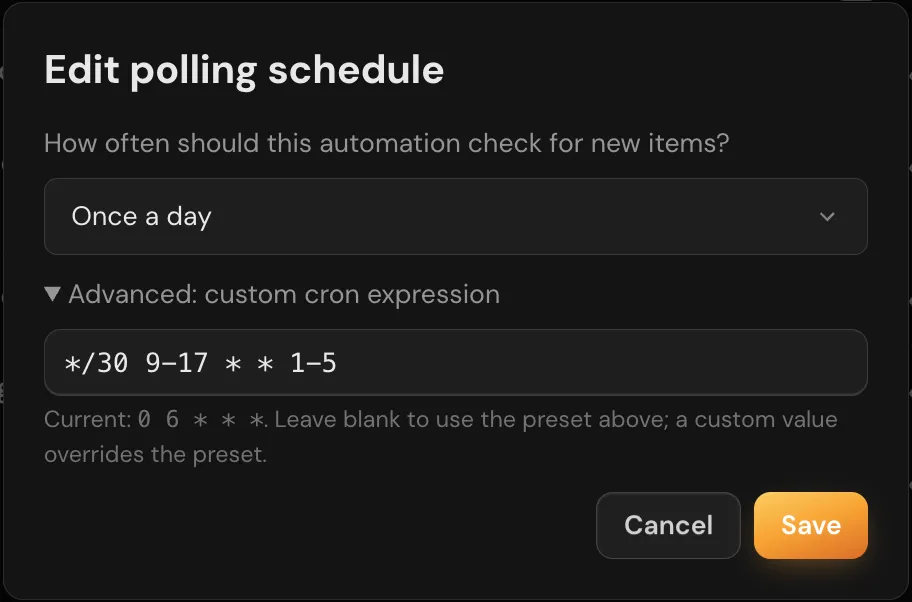
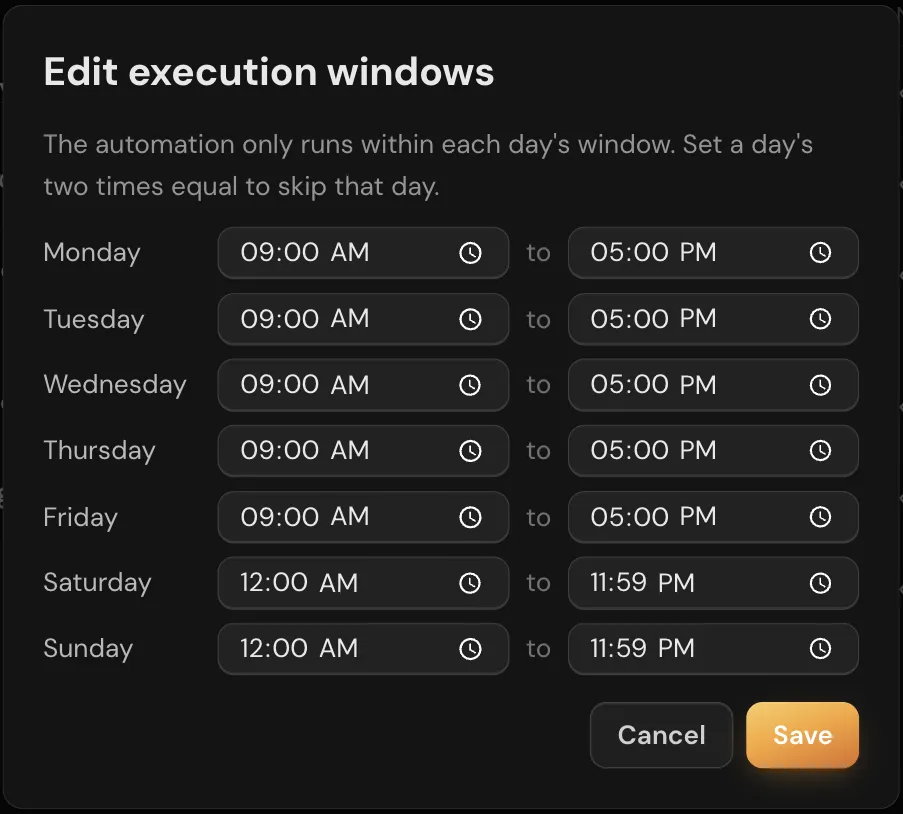
The schedule dialog has a preset list and a custom cron field. The windows dialog has one row per weekday with a from time and a to time.
Missed occurrences
A scheduled occurrence can be missed when the platform is not attending schedules, for example during a restart. APIANT records and recovers these instead of losing them silently:
- Each missed span becomes one row in Execution History with the status missed. It counts no tasks and sends no email.
- When scheduling resumes, APIANT queues one catch-up run per automation for that span, never one per missed occurrence. The catch-up runs only if the automation's next regular occurrence is not already due by then.
- There is no lateness limit. A daily report missed during an eight-hour outage is delivered on recovery, hours late.
- For a span longer than 24 hours, the missed row is written but no catch-up runs.
Catch-up runs wait behind live work such as incoming webhooks, and still respect the automation's on/off state, concurrency limit and execution windows. A catch-up is also not queued when:
- The platform has already queued its limit of catch-ups for that recovery pass.
- The automation was edited, or turned off and on, after the missed span began.
- The schedule is so frequent that its next occurrence is due by the time the catch-up could start, as with a per-minute schedule.
A missed row carries a Run it now button while its occurrence has not been served, and Run again after it has. The button runs the automation the way a normal scheduled fire would, so a polling trigger processes only records it has not seen.
A polling automation can still lose records during a long outage if the app's first page of results has moved past them by the time polling resumes.
Troubleshooting
| Symptom | Likely cause | What to do |
|---|---|---|
| Runs start an hour off | The profile timezone is wrong | Change it under Manage account |
| Nothing runs on some days | An execution window with equal from and to times, or a cron day-of-week field that excludes them | Check Edit execution windows… and ask Claude to read back the cron |
| A missed row with no catch-up run | The next regular occurrence was already due, the span was longer than 24 hours, the automation was edited during the span, or the platform's catch-up limit for that recovery was reached | Use Run it now on the row |
| Schedule dialog is missing from the gear menu | The automation has only instant triggers or is a subroutine | Add a scheduled or polling trigger |