 .AI
.AIIntroduction
APIANT.ai is a hosted automation platform: build automations between your apps by describing them to the in-app assistant or to Claude over MCP.
APIANT.ai is a hosted automation platform at app.apiant.ai that connects the apps you use and runs automations between them. You build an automation by describing it in plain English, either to the assistant inside the app or to Claude in Claude Code, which reaches your account through the APIANT MCP server.
Get started
- Build with the assistant. Sign up, open Assistant, and describe what should happen. The assistant finds the apps, asks you to connect them, builds the automation and tests it. Start with Quickstart: build with the assistant.
- Build from Claude Code. Copy one address from your account menu, sign in once, and ask Claude for automations from your terminal. Nothing to install. Start with Quickstart: build from Claude Code.
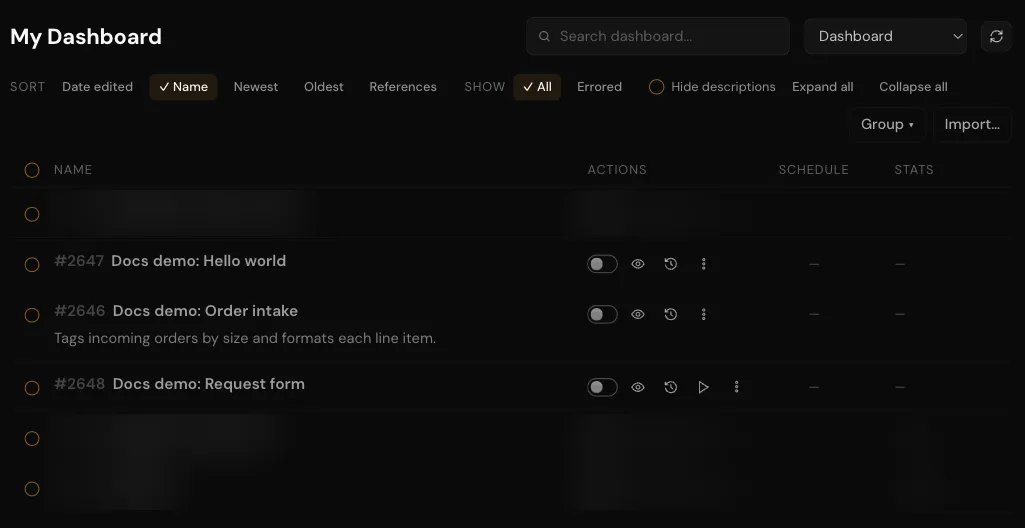
The dashboard lists your automations, each with its on/off switch, schedule, task counts and a menu of actions.
Two ways to work
Both ways act on the same account, the same connections and the same automations. An automation built in one is visible and editable from the other.
| The assistant | Claude Code | |
|---|---|---|
| Where | In your browser, under Assistant | In your terminal, in a project directory |
| Builds, edits and tests automations | Yes | Yes |
| Connects apps | Yes, with a Connect button in the conversation | Yes |
| Builds connectors, triggers and actions for an app | No, it offers your own AI client instead | Yes, when your plan allows app authoring |
| Cost | 20 assistant credits per message | No credits |
Both ways count tasks when your automations run. Credits and tasks by plan are listed on apiant.ai/pricing.
What you can build
When an app or operation is missing from the catalog and your plan allows app authoring, Claude can build it in Claude Code from the app's API documentation. Beyond app-to-app automations, an automation can sit behind a hosted form, a chat widget, a synchronous web service, or an MCP tool that another AI client calls.
Explore the docs
- Core concepts: automations, triggers, steps, runs, connections and connectors, defined once.
- The APIANT assistant: what the in-app assistant does and what it costs.
- APIANT over MCP: the MCP server, connecting your AI client, and signing in.
- Automations: triggers, field mapping, control flow, testing, versions and error handling.
- Forms, chat, web services and tools: automations that face people or programs directly.
- Apps and connectors: connecting accounts and building new connectors.
- Execution history: what each run records, retries and error alerts.
- Your account: plans, usage, billing, linked accounts.
- Reference: MCP tools, skills, the app catalog, limits and URLs.
Next steps
In this section
Quickstart: build with the assistant
Create an APIANT.ai account, describe an automation to the in-app assistant, connect the apps it needs, test it and turn it on.
Quickstart: build from Claude Code
Add the APIANT MCP server to Claude Code, sign in, and have Claude build, test and turn on a webhook automation in minutes.
Core concepts
Definitions of the objects APIANT.ai is built from: automations, triggers, steps, actions, runs, connections, apps and connectors.