 .AI
.AIApps and connectors
What apps, connectors, operations and connections are in APIANT, how apps authenticate, and what to do when an app isn't in the catalog.
Each app in the APIANT catalog is a connector (how APIANT authenticates to the vendor's API) plus its operations (the triggers and actions an automation step can use). A connection is your own authorized account on that app, such as your HubSpot portal.
Terms
| Term | Meaning |
|---|---|
| App | A product APIANT can talk to, such as HubSpot or Slack |
| Connector | The part of an app that defines how requests are authenticated |
| Operation | One trigger or action of an app, such as New or updated contact or Add deal |
| Connection | Your authorized account on an app. You can have several per app, each with its own name. See Connecting accounts. |
| Built-in app | An app that runs inside APIANT and needs no connection, such as Forms, Chat, Web Service, Lookup Tables or Flow Control. See Actions and built-in apps. |
Operations are also called assemblies in Claude's output and in the MCP tool reference. An assembly can make several API calls and run logic between them, but an automation uses it as one step.
Finding an app
Ask Claude or the assistant whether an app is supported and what it can do, for example: "Does APIANT have an Asana trigger for new comments on a task?" Claude searches the catalog by name and, when nothing matches the name, by what the app does.
To browse, open Connections and select Connect App, then search by app name.
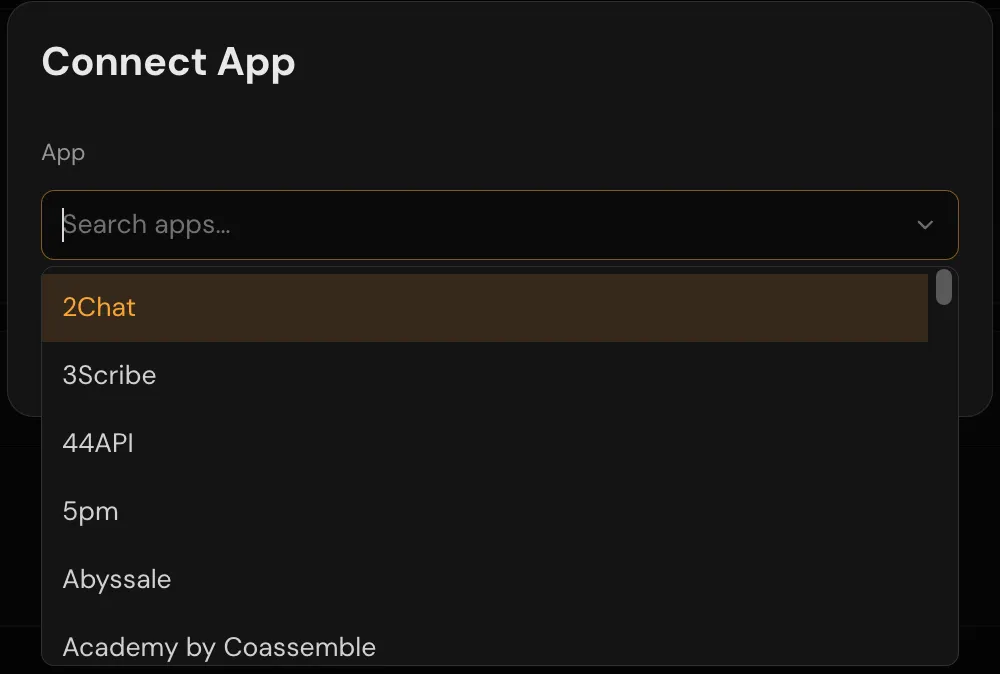
The Connect App dialog filters apps as you type. Apps marked Needs your keys connect only with app keys you supply, such as an OAuth client ID and secret from your own vendor account.
The catalog is also published as a public JSON feed; see App catalog.
How apps authenticate
| Authentication | What you do |
|---|---|
| API key or other credentials | Paste the key, and any other values the app asks for, into the connect dialog |
| No credentials | Nothing, or fill in settings such as a base URL |
| OAuth 2.0 | Sign in to the vendor and approve access |
| Managed authentication (Composio) | Sign in to the vendor through Composio. The first time, the connect dialog asks for an API key from your own Composio account, unless one is already on file for your account. |
| Token exchange | Enter credentials, such as a client ID and secret or a username and password, that APIANT exchanges for a short-lived token |
An OAuth app connects through the OAuth app APIANT has registered with the vendor, when one exists. When APIANT has none for that app, you connect with an OAuth app registered on your own vendor account. See Use your own OAuth app or API keys.
When an app or operation is missing
When you ask for an app or operation the catalog does not have, Claude or the assistant tells you. Some catalog entries carry a status with a one-sentence explanation:
| Status | What you are told | What you can do |
|---|---|---|
| Awaiting vendor approval | The app works, but the vendor has not approved the public listing yet | Connect it with your own OAuth keys |
| Deprecated | The app works, but a newer app replaces it | Build against the newer app |
| Retired or duplicate | The app is not available, or is the same app under another name | Use the replacement app named |
| Not built yet | The app is not built yet, and can be built on demand | Use one of the two routes below |
| No public API or discontinued | There is nothing to connect to | None |
Two other routes cover a missing operation:
- An API call step. The HTTP built-in app's Send an HTTP(S) request action calls an HTTP API directly from a step.
- A custom connector or operation. On plans that allow private connectors, Claude Code can read the vendor's API documentation and build the connector, trigger or action for your account. See Build a connector, action or trigger.
Next steps
In this section
Connecting accounts
Connect an app account to APIANT with OAuth or an API key, manage several accounts per app, reconnect after a 401, and disconnect.
Use your own OAuth app or API keys
Use app keys from your own vendor developer account in APIANT, and let Claude Code register the app on the vendor's portal for you.
Build a connector, action or trigger
How Claude Code reads a vendor's API docs and builds a private APIANT connector, action or trigger for your account, tested before use.
HubSpot
Install APIANT.AI from the HubSpot App Marketplace, authorize your HubSpot portal, and build your first HubSpot integration in plain language.
Intercom
Install APIANT.AI for Intercom, authorize your Intercom workspace, and build your first Intercom integration by describing it in plain language.
Cliniko
Connect your Cliniko account to APIANT.AI with a Cliniko API key, then describe the automation you want in plain English.