 .AI
.AIActions and built-in apps
The action steps an APIANT automation can run (add, get, list, find, update, delete, invoke) and the built-in apps that need no connection.
An action is a step that runs one operation from an app in the catalog, such as "Create contact" in a CRM, using one of your connections and the settings the step maps in. Most steps in an automation are actions; the rest are engine steps such as conditions and loops.
What an action step holds
| Part | Purpose |
|---|---|
| Operation | The app operation to run, chosen from the catalog |
| Connection | Which of your connected accounts to use. Built-in apps that need no credentials have none. |
| Settings | The value for each input field, as fixed text or an expression. See Field mapping. |
| Step ID | The name later steps use to read this step's output |
| Error handling | What happens if the operation fails. See Error handling and retries. |
To add an action, describe it: "after the lookup, create a deal in HubSpot with the contact's email and the order total". Claude or the assistant finds the operation, reads its input fields, maps them, and asks you about anything ambiguous. An app you have not connected yet produces a link to connect it. See Connecting accounts.
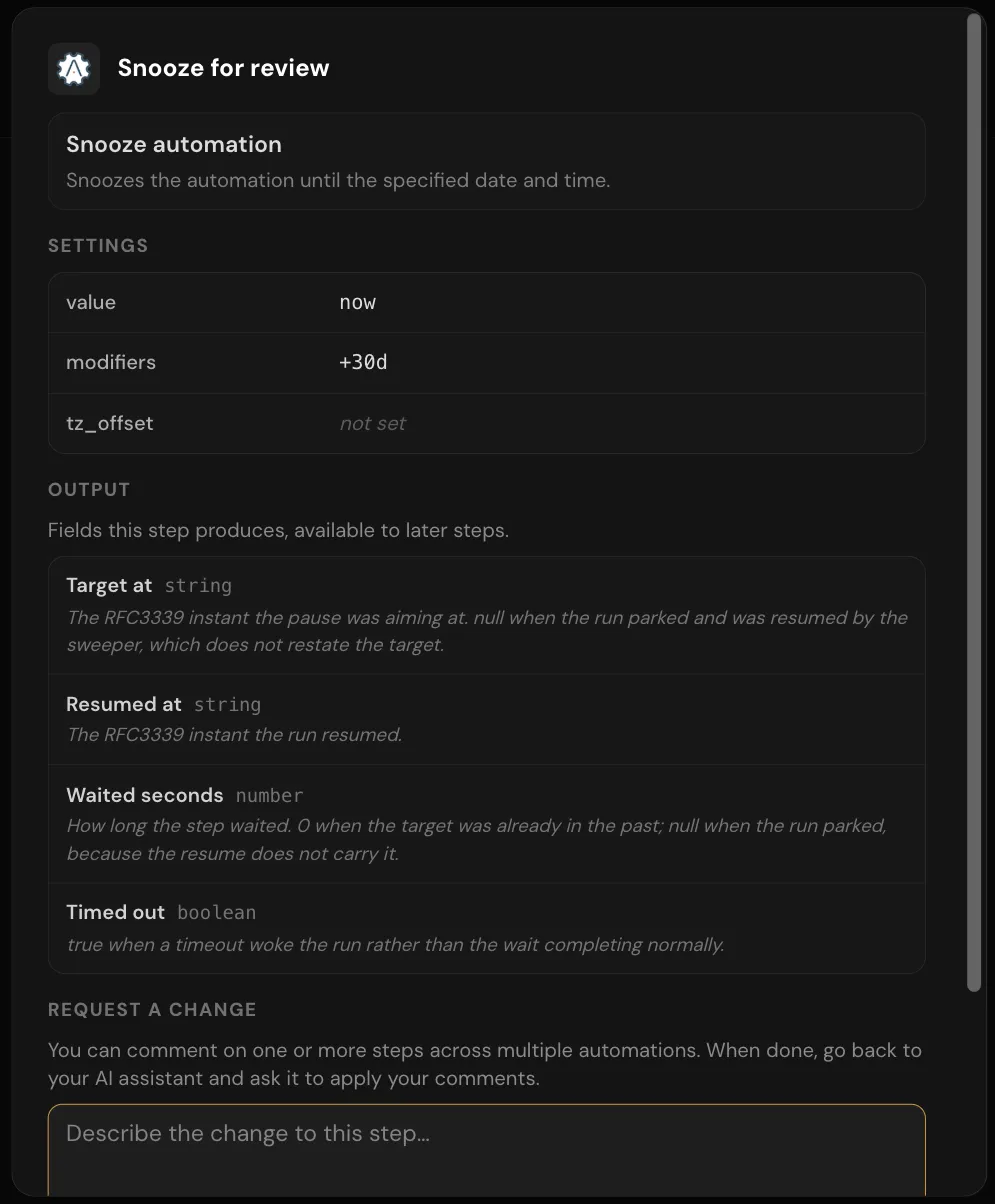
Clicking an action on the diagram opens a read-only dialog with the operation, the connected account, its settings and its field mappings.
Action shapes
Catalog operations are built to a small set of shapes. The shape tells you what an action usually returns and how it usually behaves when nothing matches; a particular app's operation can differ, so check its output in a test run:
| Shape | Typical name | Does | Returns | When nothing matches |
|---|---|---|---|---|
| Add | Create contact | Creates a record | The new record's ID | Not applicable |
| Get | Get contact | Fetches one record by ID | All of the record's fields | The step fails |
| List | List contacts | Fetches every record in a collection, across all pages | An array of records | An empty array when the collection is empty |
| Find | Find contact by email | Searches for records | An array of matching records | An empty array, not an error |
| Update | Update contact | Changes a record by ID | The updated record or a status | Depends on the app |
| Delete | Delete contact | Deletes a record by ID | The app's response, or the ID that was deleted | Depends on the app |
| Invoke | Generate summary | Calls an operation that computes something | Several output fields | Not applicable |
Two consequences for how automations are built:
- IDs are not details. Many triggers and Add, Find and List actions return only IDs or basic fields. To use a record's name, email or custom fields later, the automation needs a Get action on that ID first. Claude is instructed to add one when it sees an ID mapped into a field that expects detail data.
- A Find that matches nothing succeeds. Follow it with a condition that checks whether the result is empty, rather than relying on the step to fail. See Conditions, loops and parallel branches.
Built-in apps
APIANT includes apps that run inside the platform. None of them needs a connection. Some actions still take credentials as inputs; AI Agent message, for example, calls an AI provider.
| App | Actions and triggers |
|---|---|
| System | Snooze automation; Pause for a specified number of seconds; Pause for a random number of seconds; Generate random value; Get system info. Triggers for test data, automation errors, usage thresholds and account events. |
| Flow Control | Halt data row processing (with or without an error); No-op; Read query parameter value; Serialize automation execution; Wait for latched automations |
| Automations | Execute automation by mapped name, including linked-account variants; Find automation by name; Get automation info; Turn automation on or off |
| HTTP | Send an HTTP(S) request to any URL; Get links from HTML page |
| Lookup Tables | Save, get, find and delete values that persist between runs |
| Collector | Collect items into a bucket; Dump items from bucket; Fetch all items from bucket in order added; triggers for new items in a bucket |
| Variables | Set, Get, Increment, Append to array, Remove from array, Concatenate to string, Clear. Values last for one run. |
| Transform Text | Uppercase, Lowercase, Trim whitespace, Replace text, Split text into array, Strip HTML tags, Extract email addresses and more |
| Transform Number | Evaluate math formula; Round; Sum array of numbers |
| Transform Date Time | Modify and reformat date time |
| Transform Data | Parse CSV; Convert JSON to XML and back; Array to single value; Compare two arrays; Default if empty; Emit first non-empty value; Execute Starlark expression and more |
| Forms | Create form; Await form submission; Form submitted trigger. See Hosted forms. |
| Human Interaction | Get moderation request link; Await human moderation. See Human approval. |
| Web Service | HTTP request received trigger; Return HTTP response. See Web service automations. |
| Chat | Chat message received trigger; Send chat response and conversation actions. See Chat widgets. |
| AI Agent | AI Agent message; Tool input trigger; Tool output. See Automations as MCP tools. |
| Text to PDF; HTML to PDF; Extract text from PDF at URL | |
| Feed | New feed item triggers for RSS, Atom and RDF; Create RSS feed |
| File | Text to Temporary File |
| Account | Get account info, task info and subscription plan info |
Calling an API with no connector
The HTTP app's Send an HTTP(S) request action calls any URL. Its inputs are the URL, the HTTP verb (GET, POST, PUT, PATCH, DELETE or HEAD; GET when left blank), query parameters, headers, a payload sent as-is, and optional basic authentication. It returns the response status, headers and body, with a JSON body decoded.
Use it for a one-off call. For an API you call repeatedly, or one that needs OAuth, a connector keeps credentials and operations in one place. See Build a connector, action or trigger.
Engine steps
Some steps are part of the engine rather than an app in the catalog:
| Step | Use |
|---|---|
| Condition | Run different steps depending on an expression |
| For each | Run steps once per item in a list |
| Parallel | Run branches at the same time |
| Call automation | Run a subroutine or another automation |
| Wait for latch | Wait for launched child automations to finish |
| Script | Run a short Starlark program or expression to compute a value |
| Data transform | Reshape an array of rows: rename or delete fields, merge, split, join, compare |
| Variable | Read or write a value that lasts for the run |
Engine steps do not count tasks. Actions from the catalog, including built-in apps, count one task each time they succeed. See Automations.