 .AI
.AIConditions, loops and parallel branches
How APIANT automations branch with conditions, repeat steps with for-each loops, run branches in parallel, group steps, and stop processing a record.
Conditions, loops and parallel branches are engine steps that hold other steps inside them. You describe the logic in plain English, such as "if the contact already exists, update it, otherwise create it", and Claude or the assistant builds the structure. None of these steps counts a task; the actions inside them do.
Conditions
A condition step runs its then steps when a test is true and its else steps when it is false. The test is an expression written without {{ }} braces:
{
  "step_id": "contact_exists",
  "type": "condition",
  "name": "Contact already exists?",
  "if": "len(steps.find_contact.output.records) > 0",
  "then": [ { "step_id": "update_contact", "type": "assembly" } ],
  "else": [ { "step_id": "create_contact", "type": "assembly" } ]
}
A condition has exactly two branches. There is no switch step; for more than two outcomes, put a condition inside the else branch of another.
Writing the test
| Test | Example |
|---|---|
| Compare a value | trigger.amount > 100 |
| Match text | trigger['Plan'] == "premium" |
| Check a field is empty | steps.lookup.output.id == "" |
| Check a list has items | len(steps.list_rows.output.records) > 0 |
| Combine tests | trigger.amount > 100 && trigger.country == "US" |
| Check whether a step failed | steps.lookup_client.output.error == nil |
Field names with spaces use brackets, as in mappings: trigger['Field Name']. Wrapping the whole test in {{ }} is tolerated.
These values count as false: empty text, 0, false, an empty list, an empty object, and a missing value. Everything else counts as true.
When the data is missing
Apps often leave a field out of a response instead of returning it empty. A condition treats a missing field the same way as an empty one for equality and length:
| Test on a missing field | Result |
|---|---|
contact.phone == "" | true |
contact.phone != "" | false |
len(contact.tags) == 0 | true |
contact.score > 5 | The whole test is treated as false and the else branch runs |
rows[0].status == "ok" when rows is empty | Treated as false, and else runs |
rows[5] when rows has three items | The step fails |
Test for "nothing came back" explicitly with len(...) == 0 when the automation should behave differently in that case.
What a condition outputs
A condition's output field branch is then, else, or none. none means the test was false and the condition has no else branch. To check which way a condition went, test branch == "then", since branch == "else" misses the none case.
Loops
A for-each step runs its do steps once for every item in a list. items is an expression that must produce a list:
{
  "step_id": "each_line_item",
  "type": "for_each",
  "name": "Create a line for each order item",
  "items": "trigger.body.line_items",
  "max_iterations": 500,
  "do": [
    {
      "step_id": "create_line",
      "type": "assembly",
      "settings": {
        "SKU": "{{ loop.item.sku }}",
        "Quantity": "{{ loop.item.qty }}",
        "Line Number": "{{ loop.index + 1 }}"
      }
    }
  ]
}
Inside the loop body:
| Value | Contains |
|---|---|
loop.item | The current item |
loop.index | The position, starting at 0 |
loop.first, loop.last | true on the first or last pass |
loop.length | How many passes the loop runs, after any cap |
Iterations run one after another, in list order. If items is not a list, the step fails.
Limits and stopping early
max_iterationscaps the number of passes. Leaving it out means no cap.- A break loop step inside the body stops the loop. No further items are processed, and the output from the pass that broke is kept.
What a loop outputs
| Field | Meaning |
|---|---|
iterations | How many passes ran |
total | How many items the list had, before any cap |
truncated | true if max_iterations dropped items |
broke | true if a break loop step stopped the loop |
results | One entry per pass that ran, in order: that pass's last step output |
Check truncated when a list can exceed the cap. The run still succeeds when items are dropped, so the dropped items are otherwise invisible.
To collect values across passes for use after the loop, use the Variables app: Append to array inside the loop, Get after it.
Parallel branches
A parallel step runs several branches of steps at the same time:
wait | Behavior |
|---|---|
all (default) | Waits for every branch. If any branch fails, the step fails. |
any | Finishes when the first branch succeeds. The other branches are cancelled, and the step waits for them to stop before continuing, so a cancelled branch cannot start another write. The step fails only if no branch succeeds. |
Each branch starts from the data available before the parallel step. A step in one branch cannot read a step in another branch; a later step after the parallel step can read any branch that completed. Steps that pause the run, such as Snooze or waiting for child automations, are refused inside a parallel branch.
Groups
A group draws a labelled box around a run of steps on the diagram, and can be collapsed. It has no effect on how the steps run: the grouped steps execute in place as if the group were not there.
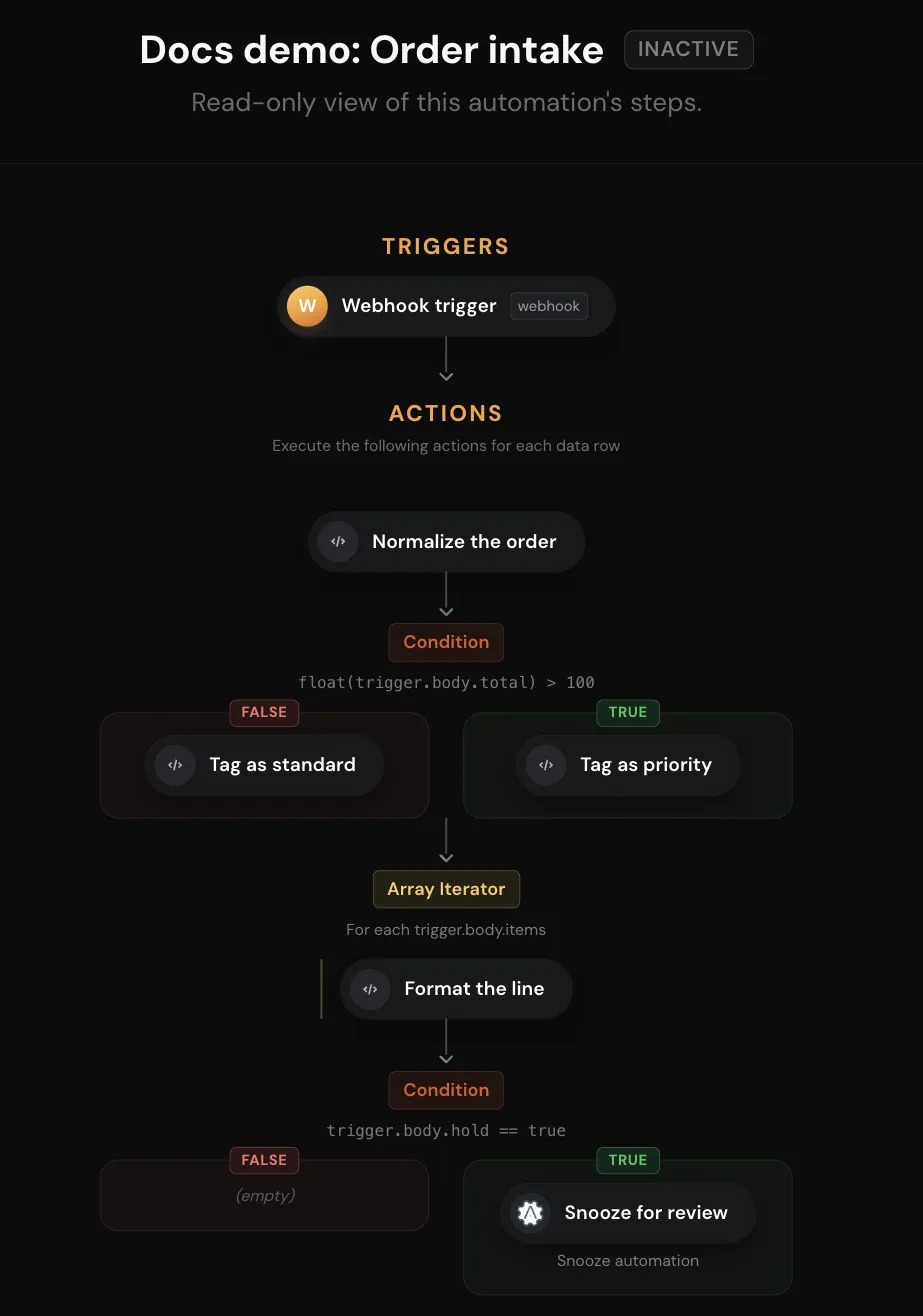
The diagram shows each condition's branches and each loop's body steps nested under the step that holds them.
Stopping a record
The Flow Control app has two actions that stop the current record without running its remaining steps:
| Action | Record ends as | Use |
|---|---|---|
| Halt data row processing | Success | Skip a record on purpose, such as a test contact |
| Halt data row processing with error | Error, with your message | Stop a record that should be investigated. The message can trigger an alert. |
For a polling trigger that returned several records, processing continues with the next record. The remaining steps are skipped at every nesting level, and error handlers do not run for a success halt.
There is no step that stops every record in a run at once.
Running automations one at a time
The Flow Control action Serialize automation execution makes runs that share a group name wait for each other. A run holds the group from that step until the run ends. A run that parks, for example on a snooze, releases the group and takes it again when it resumes.
- Place the step first in the automation so the whole run is covered.
- The scope is My account (default) or Linked accounts.
- A run waits up to 30 minutes for the group. If the wait runs out, the step fails.
- A run holds the group for at most 60 minutes; a longer run loses the guarantee for its remainder.
Troubleshooting
| Symptom | Likely cause | What to do |
|---|---|---|
A condition always takes else | The test compares a missing field with > or <, or the field name is wrong | Ask Claude to compare the test with the step output recorded in the run, and check field names and brackets |
| A step after a condition reads blank | The step it reads is in the branch that did not run | Test the condition's branch, or store the value in a variable in both branches |
| A loop processed fewer items than expected | max_iterations capped it | Check truncated and total in the loop's output |
| A parallel branch reads blank from a sibling branch | Branches cannot see each other | Run those steps in sequence instead |