 .AI
.AIAsk about an automation or a failed run
Open an APIANT assistant conversation from the dashboard or from a failed run in Execution History to find out what an automation does or why a run failed.
Ask about this opens a conversation with the assistant about one automation, with an opening question already sent. From the dashboard the question is about the automation; from a failed run it names the execution number and asks what went wrong. Both lead to your one conversation for that automation, so pressing either twice does not create a second conversation. Each press sends its opening question again.
Prerequisites
- The assistant available on your account, with credits left this month. Ask about this is hidden otherwise.
- 20 credits for the opening question, which is sent as a message each time you select Ask about this.
Ask about an automation
- On the dashboard, open the automation's More actions menu (the three dots on its row).
- Select Ask about this at the top of the menu.
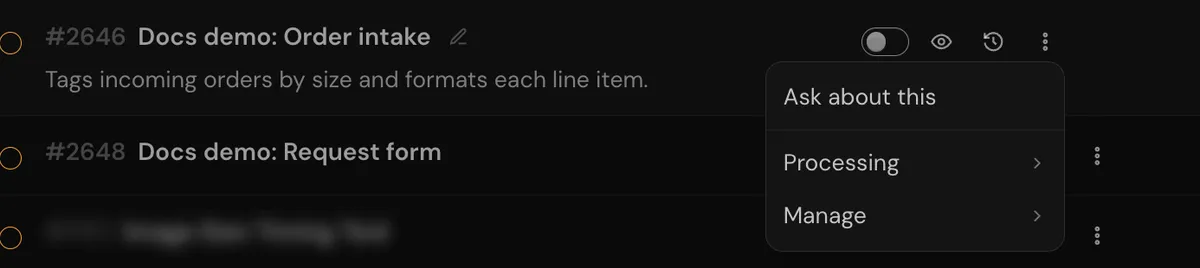
Ask about this sits at the top of the menu, above the Processing and Manage submenus.
The conversation opens with the message I have a question about my automation "<name>". and the assistant answers from the automation's current configuration. Follow up with what you want to know:
What does the second step do with the order total?
Why didn't this run for the order that came in at 3pm?
Ask about a failed run
- On the dashboard, open the automation's execution history from its row. The error badge opens it filtered to failed runs.
- Find the run that failed and select Ask about this on its row. The button appears only on runs with an error.
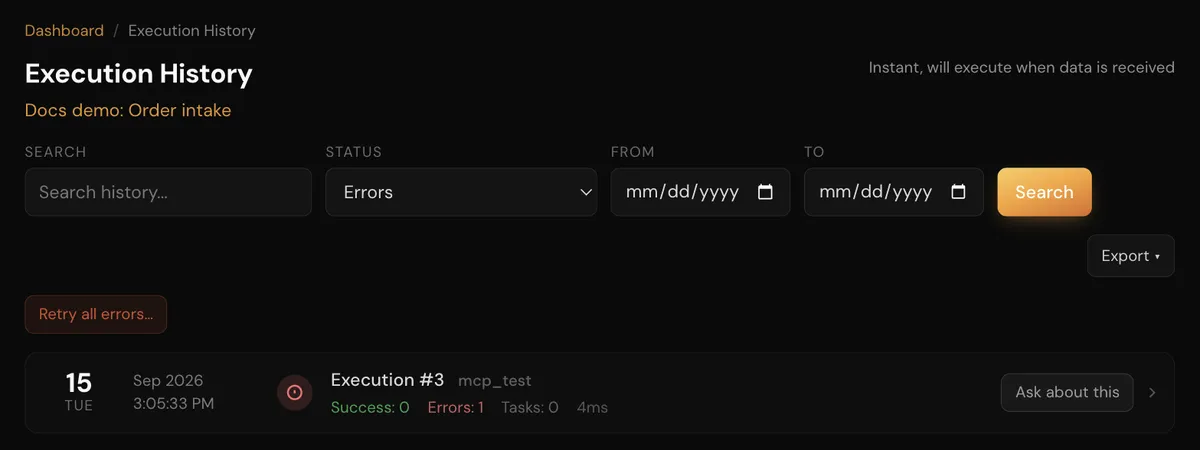
Each failed run in the list has an Ask about this button.
The conversation opens with Execution #<number> of my automation "<name>" failed. What went wrong? The assistant then:
- Reads the failed run step by step, including the input and output of the step that failed.
- Reads the automation's configuration and compares it with what the run did.
- Explains the cause in plain language and names the step involved.
- Suggests a fix and asks before changing anything.
If you approve the fix, it edits the automation, saves it, and offers to test it again.
Retry the failed run
After a fix, ask the assistant to run the failed execution again. The retry is a new run that reuses the failed run's recorded trigger data.
Retry execution #42.
Retrying applies to webhook runs and runs that processed a single record. A polling run that processed several records cannot be retried this way, because retrying it would process the records that succeeded again.
When an automation fails later
A conversation bound to an automation is told when that automation fails: a message about the failure appears in the conversation. If nobody had the conversation open when it arrived, you also get an email with the same message. The same failure repeating is not announced on every run. Open the conversation and ask what happened.
Troubleshooting
| Symptom | What to do |
|---|---|
| No Ask about this in the menu or on the run | The assistant is not available on your account, or you have no credits left this month. Check Account Usage on the dashboard. |
| Ask about this is missing on a run | It shows only on runs with an error, in an automation's own execution history. |
| The assistant says it cannot see the run | Runs older than your plan's history retention are removed. Ask about a more recent failure. |
| After a fix is saved, the assistant says "I've kept this conversation on the first automation" | The fix was saved. A conversation opened with Ask about this is attached to that automation, and the message appears when a save happens in it. No action is needed. |
| Retry was refused | The run processed several records. Ask the assistant to test the automation with sample data instead, or wait for the trigger to fire again. |
| You want a replay of the original webhook or a restart from the failed step | The assistant cannot do either. Claude Code can; see Retries, replays and restarts. |